2020年5月24日星期日

How to use Xtool X-100 PAD2 Read VW pin ?

If you have Xtool X-100 PAD2 and want to use it to do many immobilizer functions, dont know how to do it ? Lests check how do I use X-100 Pad2 to read VW pin successful.
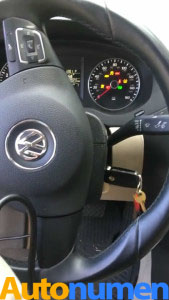
1. Plug Xtool X-100 Pad2 to the VW
2. Turn on Pad2
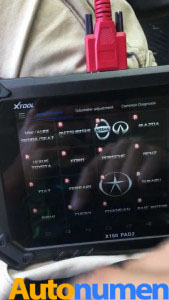
3.Come to Xtool X-100 Pad2 function menu, choose “VW/Audi Skoda/Seat”
1
4.Click on “Agree”
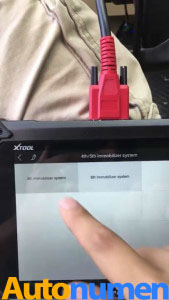
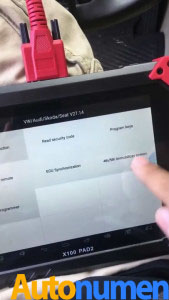
5.Click on “4th/5th Immobilizer system”
2
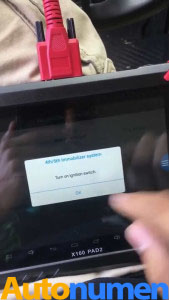
6.Receive tip: Turn on ignition switch.
3
4
5
7.Choose “4th Immobilizer system”
6
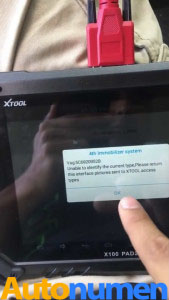
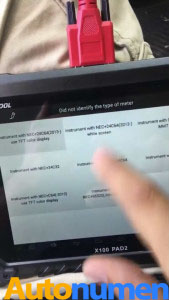
8.Receive VAG code: Did not identify the type of meter
7
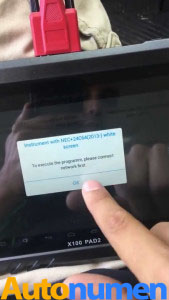
9.Choose “Instrument with NEC+24C54(2013) white screen”, to excecute the program, please connect network first.
89
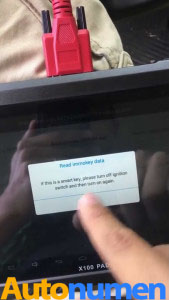
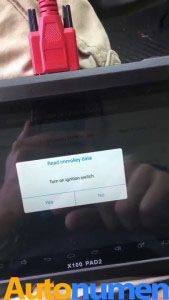
10.Choose “Read Immokey data”, to turn on ignition switch according to the instruction.
1011
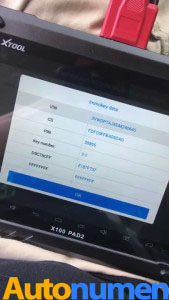
11.Pin code read out OK
12
12.Done.
Any other question , welcome to contact us online .
Thank you

2020年5月23日星期六

Xtool X100 Pad2 key program & pin code read feedback

I post here what is working on x100 pad 2, thanks for users’ experience.
Looks like Xtooltech Tablet is working with most makers, generally speaking if you live in Argentina, Brazil, Mexico, you will find Xtool X100 Pad2 is very used.
Part 1: Xtool X100 Pad2 Yes
Chevy:
Onix 2014 add key okay
Cruze 2013 add key okay
cobalt 2015 add key okay
Opel/Chevy:
Montana 2009 read pin code and add key okay
Corsa c 2010 brazilian model add key is okay
Ford:
fiesta 2011 add key okay
focus 2012 add key okay
focus titaniun 2014 add key okay
Ford C-max 2011 add key ok.
Renault:
sandero 2014 (old version) add key okay,
sandero 2009 , add key okay
kangoo 2011 add key okay
I’ve did several Megane Scenic 2 before 2008 very well. After 2008, Xtool X100 Pad2 read wrong pincode. But with correct pin, it program OK card.
Citroen:
Citroen c3 2008 read pin code and add key okay
Citroen c4 2010 add key okay
Citroen C4 2005 Fail read PIN code in French version ! But OK in English
Peugeot:
207 2010 add key okay
206 2007 add key okay
Honda:
civic 2011 add key okay
civic 2007 add key okay
Honda civic 2002 id48 add key ok!
Honda hr 2015 add key okay
VW:
golf 2003 read add key okay
gol 2012 g5 add key okay
voyage 2009 add key okay
santana 2005 add key okay
parati 2007 add key okay
fox 2008 add key okay.
Vw Sharan 2003 add key ok
Vw golf4 2001 no pin code reading, program key ok.
Vw Passat 2004 read pin code ok program key ok!
Fiat:
uno way 2013 dash ,, read pin code, make a dealer key , and add key is okay
Fiat uno 2007 , key prepared by effi and added by pad 2 obd connection + pin code,,
Fiat palio fire economy 1.0 year 2010 key added by pad 2 ,, same as fiat uno
Fiat strada , 2009 and 2008 ,, same as uno and palio
all them imobox 1k59h,,
Fiat doblo 2003 , key prepared by effi and added by pad 2
Fiat siena 2001 , key prepared by effi and added by pad 2
Fiat palio wekend 2002 key prepared by effi and added by pad 2
all them same body computer ,, 93lc66 ,,
big motherboard and small motherboard
Kia sportage 2015/16 add key okay
Fiat palio 2005 bc 1k79x
Fiat palio 2011 bc 1k79x
Fiat siena 2007 bc 1k79x
Fiat strada 2009 bc 1k79
all them added key okay by obd +pin code,, key prepared by zed bull + effi.
fiat gran siena 2014
key prepared by effi+upa+zed bull ,
and key added by pad2 by obd ,,
bcm 326 g .,
Dacia sandero 2016 key and pin code okey
Toyota corolla 2015 brazilian version okay
blazer 2014 okay add key ,
Hyundai hb20 2016 add key okay.
Mitsubishi asx 2013 , transponder prepared by handy baby
and added by pad 2.
LR Sport 2009 add Chinese remote key OK
RAM 1500 2012 add Fobik OK
Nissan note 2015 ok
Clio 2 ph2 2005, auto pin and program 7946: OK
Scenic 2 2006, auto pin and program card: OK
Scenic 2 2009, read pin but wrong, use FnR to finish the card.
Mazda bt50 2017 odometer change work!!! in 30 seconds
seat altea 1.9 tdi 2008 add new remote (wich is programed by vvdi tool) succes!!
key adding nit tryed( don’t have pin pin read fail) new id48 copyed by silca rw4+.
megane/scenic (2006 check one more time) read pin code ok ,add key card success.
Peugeot 207 2006 add new key/remote success.
I notice copy 48 transponder (96 bit) function under VAG Immo Menu in x100 Pad 2.
function under VAG Immo Menu copying 4th immo 96bit key:
1. upload data,
2. download data,
3.Copy key,
4.Make dealer key
PS: For French people ( in French language ) for French car (Citroen, Renault, Peugeot), better use English…One user’s feedback.
Also one user feedback:
Actually there is a software version x100 pad2 for brazil
In this version it is possible to make programming of the new renault 2015+ only with internet connection. Brazilian cars is different story. There must be some difference between them and European cars. Same as VAG, many of new VAG UDS got only MM dash which can be done without working key via OBD and CAN-BUS system many of doesn’t need precoding by CS, just standard CAN bus make precode.
Part 2: Xtool X100 Pad2 Failure list which hope the manufacturer fix them
Vectra c euro. Not work.
No comm.
Audi a4 b5 vdo dash or separate immo nox not work no com no pin read.
Audi a6 pre fl diesel petrol no pin read not work.
qashqai 2+2 same as pathfinder not work . Keyless add not work . Ad chip no work bricked car.
Need fix opel key learn. Not work
And no Chinese tool can read PSA PIN code before 2005 ( except C4 )
so who read psa pin before 2005?
The answer is
1) main dealer or customer code card !
2) in ECU or BSI eeprom
Nissan Navara 2009. Read BCM code ok program key communication fault. I finished work fvdi 2014
In conclusion:
Xtool X100 Pad2 is not 100% but seem to be working on most.
John Deere Service Advisor EDL V2 Diagnostic Kit

Support Languages: English, French, German, Italian, Portuguese, Russian, Spanish.
John Deere Service Advisor  Agriculture workshop service manual, repair manual, electrical wiring diagram, hydraulic diagram, diagnostic, assembly and disassembly engine, transmission.
John Deere AG Management Solutions, Attachments, Backhoes, Combines and Headers, Cotton Harvestings, Excavators, ForkLifts, Hay and Forages, MAte Hand Cut and Shredderses, Plantings and Seedings, Skid Steers, Sprayers, Sugar Cane Harvesters, Tillages, Tractors, Worksite Pro Attachments.
John Deere Service Advisor  CF (Construction and Forestry), workshop service manual, repair manual, diagnostic, electrical wiring diagram, hydraulic diagram John Deere.
John Deere Service Advisor  CCE (Commercial and Consumer Equipment)dealer technical assistance, diagnostics, connection readings, calibrations, interactive tests, specification, tools, assemble and disassemble presented all models John Deere Construction Equipment and some models Hitachi, Euclid, Bell and Timberjack.
JOHN DEERE diagnostic adapter for construction equipment, agriculture, engines John Deere.

2020年5月22日星期五

(Solved) John Deere Service Advisor Search Engine Error

This is for anyone when he/she runs the John Deere Service Advisor heavy duty diagnostic software, the system appears error message that the search engine module can not be loaded and then the program ends.
NOTE THAT YOU ARE TRYING ANY TRICK ON YOUR OWN RISK.
Optional solutions:
Solution 1:
Run as system administrator, roll back pc date reactivate using activator Then roll date back to normal date if error still renew once again. Been working for me so far.
Note that, don’t know how long it stay working but works im sure someone will have solution for it soon.
Also advice if doing fresh install roll back the date on pc do the install after then install and activations have been done.
Go to task manager look for the service adviser on have it start its tasks in 2030 :save and then reset your pc date should be good for while
Solution 2:
if you set a date before the lightweightidol license expired, start the lightweightidol service, set the real date and start Advisor, it works.
Solution 3:
start advisor. when error comes with “search engine” Close John Deere SA. afterwards set your PC date to feburary 2015. start SA again (run as administrator). it now comes with error on licence. close SA Again. set pc date back to normal. run SA Again. now it Works.
Solution 4:
The search engine error can be solved.
Set back the date, before the expiry date found in Service ADVISOR\SUIR\license.log (august 14 in my case). Start LightweightIDOL service. Set the real date, and Advisor working again.
I made a batch file to simplify it. To make it work Control Panel/Regional/short date format have to be yyyy-mm-dd or you have to modify batch. Maybe you have to modify ServiceADVISOR.exe path too in the batch. Have to run as administrator.
Solution 5:
I have had the same error with ssearch engine connection in JD SA.
reinstalled it twice, changed system date back and forward, run activator. No result for me.
But actually I found the solution for this issue.
Solution 6:
back date to 08.10.16
install JD SA, restart, activate, mount latest disk you have (05.2016) and install update, for finish get license error, ignore and close, set actualy date, run JD SA -> works fine, install july update
testing today on 3 laptops (Windows 7 and 10)
On a side note: procedure about turning off the updates don’t know how long it stay working but works im sure someone will have solution for it soon.
Also advice if doing fresh install roll back the date on pc do the install after then install and activations have been done.
goto task manager look for the service adviser on have it start its tasks in 2030 :save and then reset your pc date should be good for while Smile (SO TURN IT OFF IN TASKMANAGER SO IT STARTS 20 30 YEARS FROM NOW!!)
Fresh new installations also work but can be much more complicated sure a patch would be much easier. But it can be done with out a patch so far
In taskmanager I don’t stop any service just put service advisor updater to 2030 to start
also makes sure eculp.ini configurator reads like this
A valid ECULP License has been found
Licenses for the following modes have been found:
TestCell Programming
FinalEOL Programming
Service Programming
ECUCPP Programming Tool
All JD Components were found and properly licensed
JDEcu : Version 1.0 : 01-apr-2021
JDConfig : Version 1.0 : 01-apr-2021
JDData : Version 1.0 : 01-apr-2021
JDIntelHex : Version 1.0 : 01-apr-2021
JDPayloadReader : Version 1.0 : 01-apr-2021
JDPayloadProcessor : Version 1.0 : 01-apr-2021
ECULoaderProgram : Version 1.0 : 01-apr-2021
ECULP_TestCell : Version 1.0 : 01-apr-2021
ECULP_FinalEOL : Version 1.0 : 01-apr-2021
ECULP_Service : Version 1.0 : 01-apr-2021
ECULP_TestCell_OEM : Version 1.0 : 01-apr-2021
ECULP_FinalEOL_OEM : Version 1.0 : 01-apr-2021
ECULP_Service_OEM : Version 1.0 : 01-apr-2021
ECULP_ECUCPP : Version 1.0 : 01-apr-2021
ECULP_Direct_EOL_Output : Version 1.0 : 01-apr-2021
ECULP_OEM_DISTRIBUTOR : Version 1.0 : 01-apr-2021
Service_ADVISOR_Ag : Version 1.0 : 01-apr-2021
Service_ADVISOR_CF : Version 1.0 : 01-apr-2021